Ecommerce SEO in 2026: A Field Guide From Live Store Accounts
Most online stores pour their SEO effort into blog posts and product descriptions, then wonder why revenue from search stays flat. On the stores we manage, the money is in category pages, clean crawling and honest merchandising. Here is how we run it.

Key takeaways
- In ecommerce SEO, category pages are usually the money pages. Treat them like landing pages, not product grids.
- Faceted navigation creates endless URLs. Decide which filter combinations deserve to be indexed and keep the rest out of the crawl.
- Out-of-stock products should rarely be deleted. Keep, redirect or retire them based on whether they are coming back.
- Product schema, clean titles and unique copy on your best sellers do more than rewriting every description in the catalogue.
- Shopify and WooCommerce each have quirks worth knowing: duplicate product paths, tag pages, pagination and app bloat.
01Why ecommerce SEO is its own discipline
Ecommerce SEO is the work of getting an online store’s categories and products found by people ready to buy. It borrows from technical, on-page and content SEO, but the shape of the problem is different. A store has thousands of near-identical pages, stock that comes and goes, filters that multiply URLs, and a platform that makes some choices for you whether you like it or not.
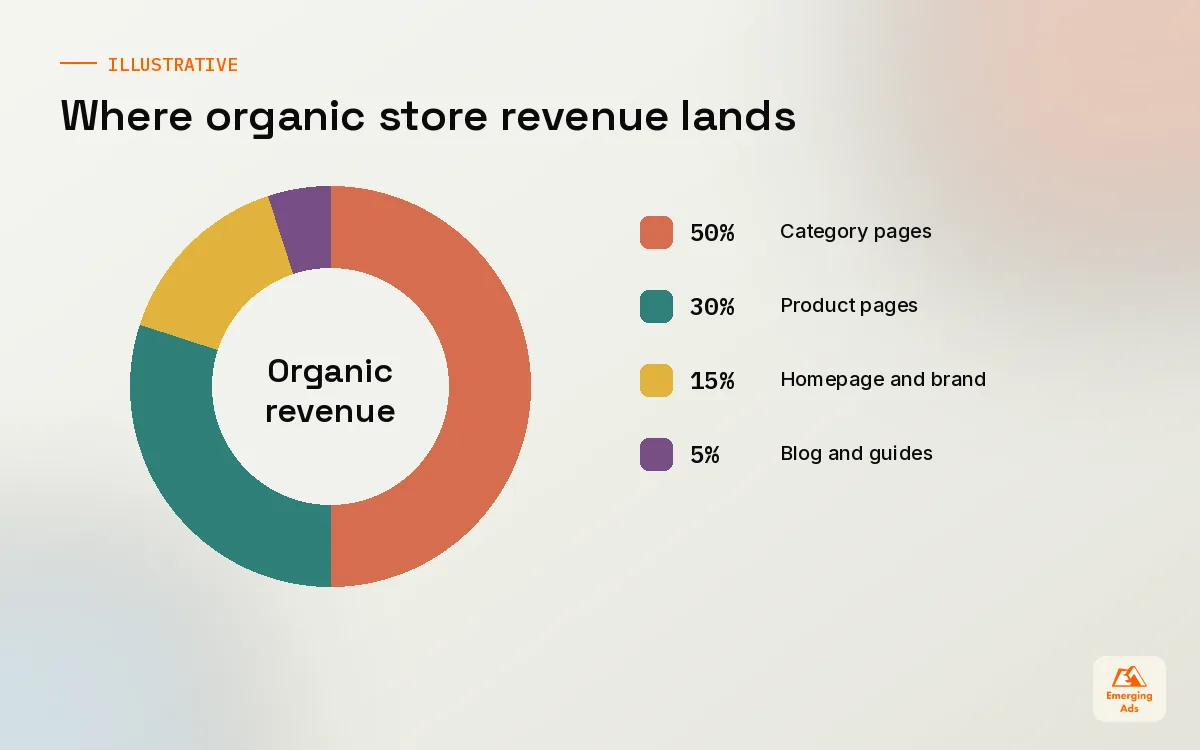
We run search for Shopify and WooCommerce stores in fashion, home, beauty, supplements, spare parts and B2B supplies. The first audit almost always finds the same thing. The team has spent months on blog posts and product descriptions, while the category pages that should bring in the bulk of organic revenue sit as bare product grids with a one-line intro. Fix that, and the rest of the plan gets easier.
02Category pages are the money pages
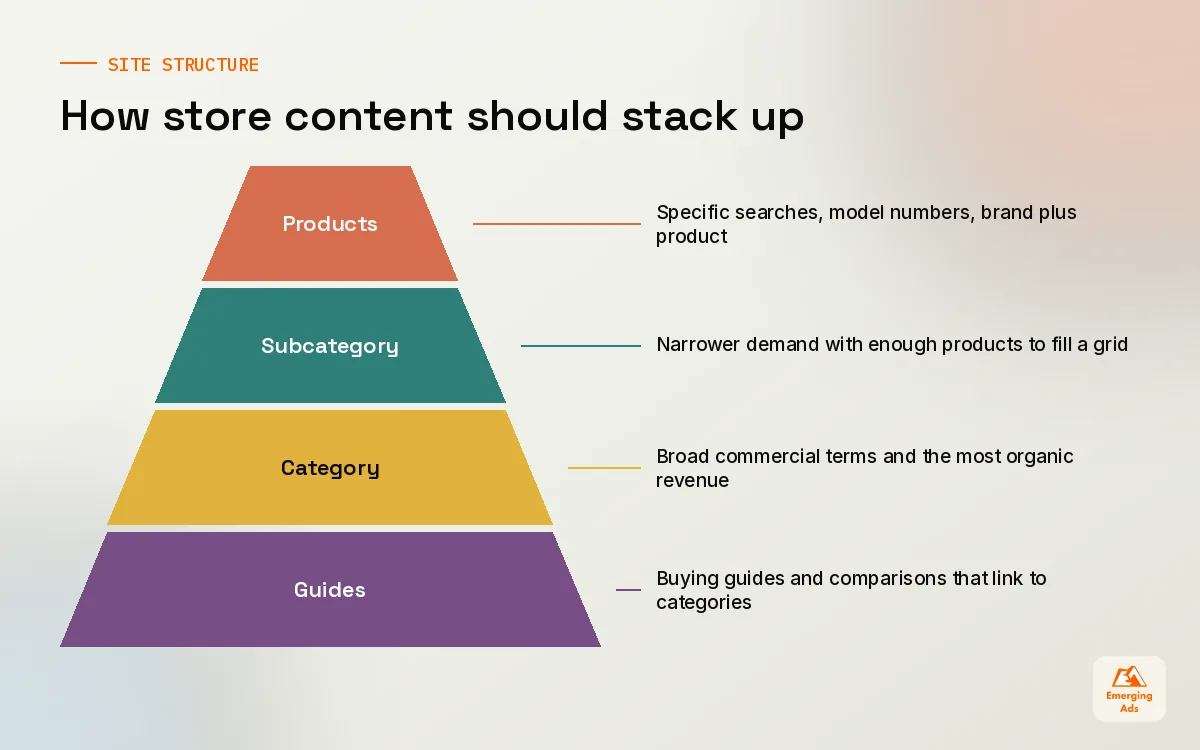
Think about how people shop. Someone searching “women’s waterproof walking boots” wants to compare options, not read about one boot. Google knows this, which is why category and collection pages tend to rank for the broad commercial terms. They carry the most search demand and the clearest buying intent. Treating them as an afterthought is the most expensive mistake in ecommerce SEO.
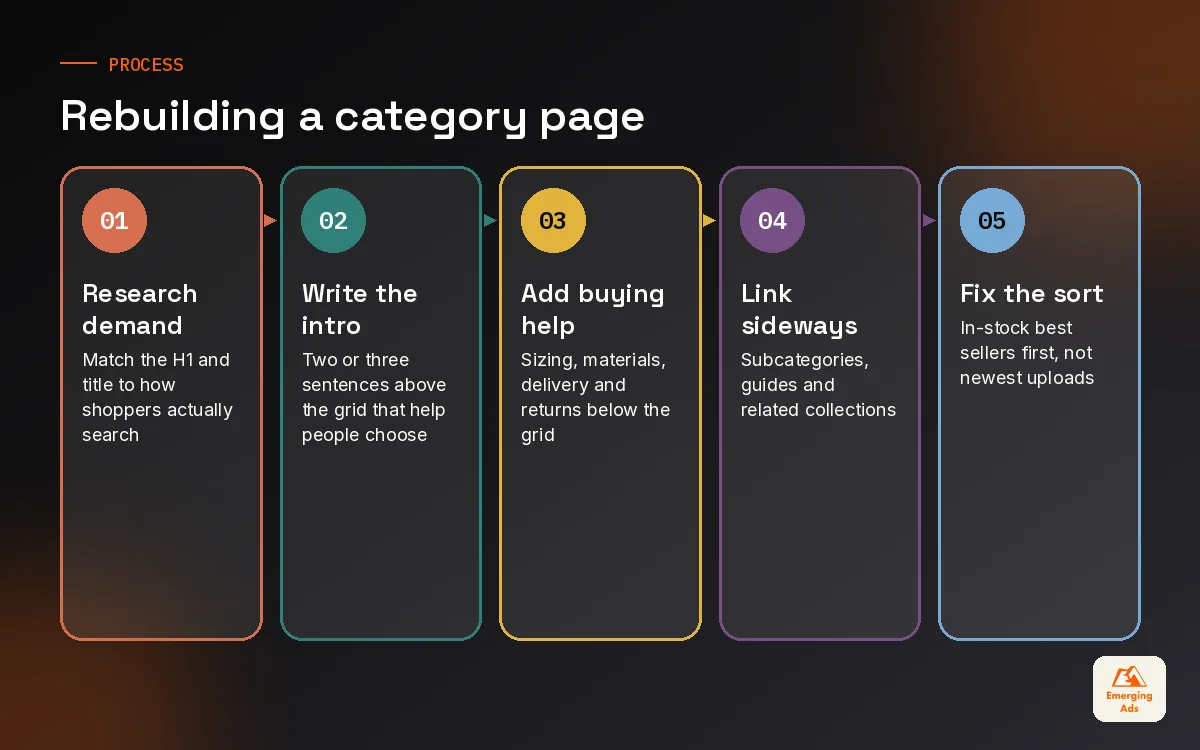
What a strong category page includes
- A title and H1 matched to how people search, found through proper research like the process in our keyword research guide.
- A short intro above the grid, two or three sentences that help the shopper choose, not a keyword block.
- Useful buying guidance below the grid: sizing notes, materials, how to choose, delivery and returns in plain words.
- Links to related subcategories so shoppers and crawlers can move sideways and down.
- A sensible default sort that puts in-stock best sellers first, not the newest upload.
- A handful of real questions answered, taken from customer service emails and reviews.
A homeware client had a “linen bedding” collection with 140 products and eleven words of copy. We rewrote the intro, added a short guide on linen weights and care beneath the grid, linked the duvet cover, pillowcase and fitted sheet subcategories, and changed the default sort. It became the store’s strongest organic page within a few months. Nobody touched a single product description.
Subcategories: when to create a new one
Create a subcategory when there is real search demand for it, enough products to fill it, and a shopper would genuinely want that view. “Linen duvet covers” passes. “Blue linen duvet covers king size” usually belongs to a filter, not a page. This one decision prevents most of the thin-page problems we clean up later.
03Product pages that sell and rank
Product pages matter most for specific, high-intent searches: model numbers, brand plus product, exact variants. For most catalogues you will not write unique copy for every item, and you do not need to. Put the effort where the demand is: best sellers, hero products and anything with branded search volume.
| Element | Common problem we find | What we do instead |
|---|---|---|
| Title tag | Product name only, or an auto-generated string | Product, key attribute, brand, kept readable |
| Description | Manufacturer copy used by fifty other retailers | Rewrite best sellers first, add fit, use and care notes |
| Images | File names like IMG_4471.jpg and no alt text | Descriptive file names and alt text, compressed properly |
| Reviews | Loaded by a script search engines struggle with | Reviews rendered in the page HTML where the app allows |
| Variants | Every colour on its own URL with the same text | One page with variants unless each colour has real demand |
| Internal links | Dead end with no route back to the category | Breadcrumbs plus related and complementary products |
Product schema and merchant listings
Structured data tells search engines the price, availability, brand and review details of a product in a format they can read reliably. Most modern themes output Product schema, but we regularly find it broken: wrong currency, availability stuck on “InStock” for sold-out items, or reviews marked up that are not visible on the page. Validate your templates with Google’s Rich Results Test and keep your Merchant Center feed consistent with what the page says. If you also run paid campaigns, a clean feed helps your Google Shopping ads too.
04Faceted navigation and crawl traps
Filters are brilliant for shoppers and dangerous for SEO. Colour, size, price, brand and material filters combine into thousands, sometimes millions, of URLs. Search engines can waste their time crawling “red, size 9, under 50, sort by newest” instead of your real categories. On one parts retailer we audited, a crawl found vastly more filter URLs than real products, and several important categories were barely being crawled.
The rule we use
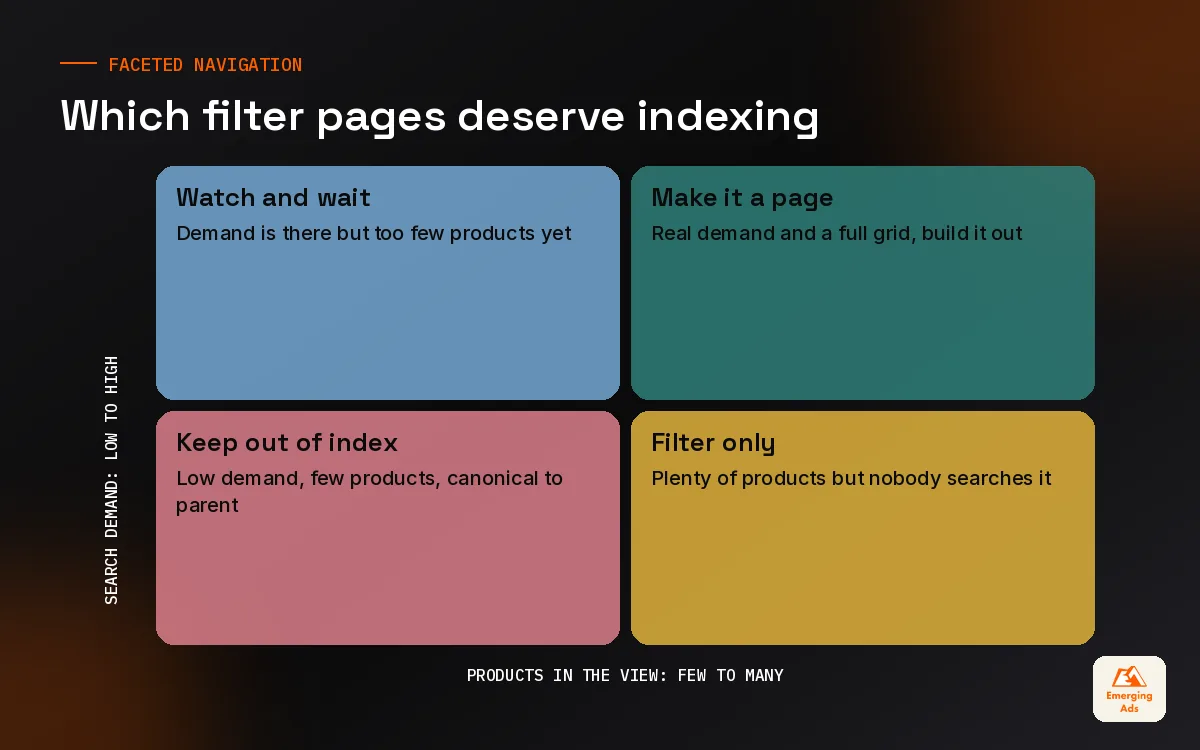
A filtered view earns an indexable URL only if people search for it and it would make a good landing page. “Men’s leather boots” might deserve a proper page. “Men’s leather boots, size 10, brown, sorted by price” does not. Everything that fails the test should be kept out of the index and, ideally, out of the crawl.
- List the filter combinations with real search demand and make them proper, static category pages with their own copy.
- Keep all other filter URLs out of the index with a canonical to the parent category or a noindex, depending on the platform.
- Block pure crawl waste, such as sort orders and session parameters, in robots.txt once you are sure nothing valuable lives there.
- Make sure filter links that should not be crawled are not presented as plain followable links on every page.
- Re-crawl with a tool such as Screaming Frog and compare the URL count to your real catalogue size.
The deeper mechanics of crawling, canonicals and robots.txt are in our technical SEO field guide. Watch the Pages report in Google Search Console after changes: a fall in “crawled, currently not indexed” filter URLs is usually a good sign.
05Out-of-stock, discontinued and seasonal products
Stock changes constantly, and how you handle it decides whether your store slowly leaks rankings or keeps them. The worst habit we see is deleting products the moment they sell out. The page, its links and its history disappear, and customers who bookmarked it land on a 404.
| Situation | What we recommend | Why |
|---|---|---|
| Temporarily out of stock | Keep the page live, mark it out of stock, offer a back-in-stock alert and alternatives | The page keeps its rankings and still earns sign-ups |
| Discontinued, clear replacement | 301 redirect to the replacement or newer model | Passes signals to the closest match for the shopper |
| Discontinued, no replacement | Redirect to the parent category, or keep a page with alternatives if it still gets traffic | Avoids dead ends and keeps value in the category |
| Seasonal product | Keep the URL year-round and reuse it each season | Rankings build over years instead of restarting |
Seasonal categories work the same way. A “Christmas gifts for him” page that lives on one URL for years will almost always beat one rebuilt each November with a new address. Keep the URL, refresh the products and copy, and link to it more prominently when the season comes round.
06Shopify and WooCommerce quirks worth knowing
Shopify
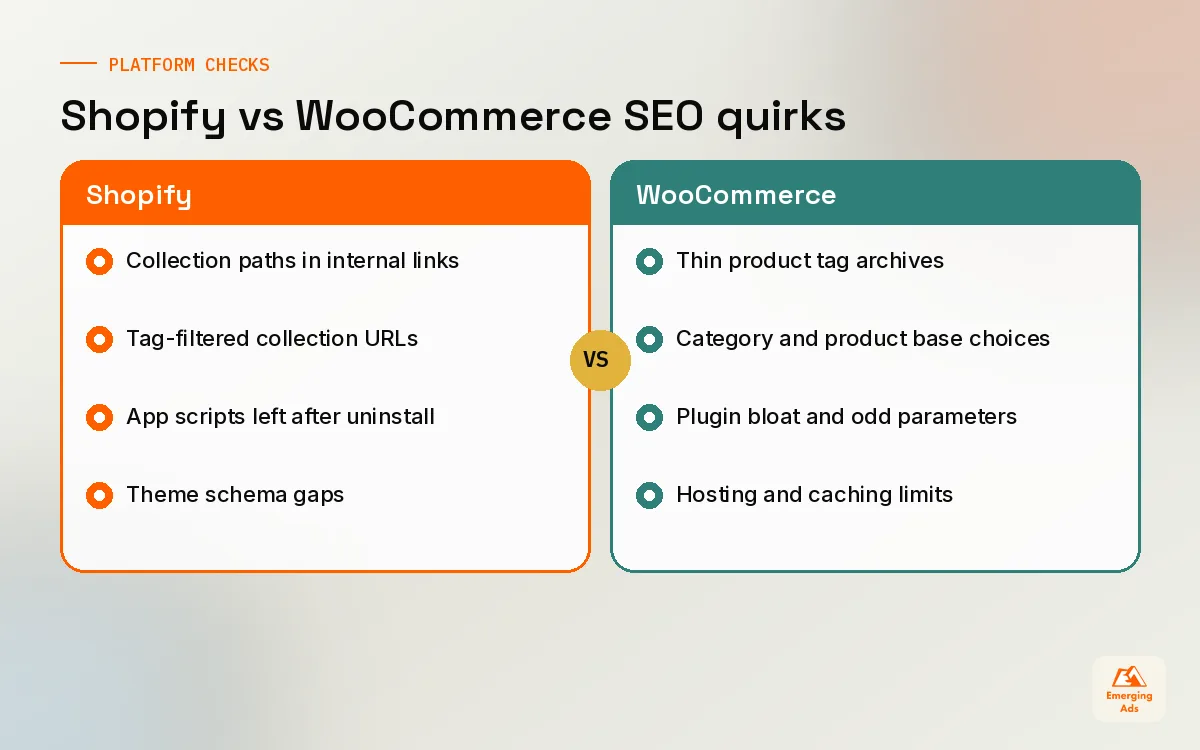
- Products can be reached through collection paths as well as the main /products/ URL. The canonical points to the main URL, but many themes still link internally to the collection path. We edit the theme so internal links use the canonical URL.
- The URL structure is fixed: /collections/ and /products/ cannot be removed. Do not fight it, it is fine for ranking.
- Tag-filtered collection URLs can multiply quickly. Decide whether they deserve indexing and control them in the theme.
- robots.txt can be edited through the robots.txt.liquid template, so crawl waste is fixable without hacks.
- Apps add scripts that slow pages down. Every uninstalled app can leave code behind, which is where Shopify speed optimisation earns its keep.
For ongoing theme changes, app audits and template fixes, our Shopify website management team handles the store while SEO handles the strategy, so fixes ship quickly instead of sitting in a queue.
WooCommerce
- Product tag archives often duplicate categories with thin content. We usually noindex them or drop them.
- Category base and product base settings affect every URL. Decide early, because changing them later means a big redirect job.
- Plugins for filters, reviews and page builders can add heavy scripts and odd URL parameters. Test each one with a crawl.
- Hosting matters more than on Shopify. Cheap shared hosting and no caching show up directly in load times.
WooCommerce gives you more control and more ways to break things. When we set up a store properly through our WooCommerce marketing setup, the SEO settings, analytics and feed are configured together so they do not contradict each other later.
07Content that supports categories, not competes with them
Blogs on ecommerce sites often do more harm than good. We see posts targeting “best running shoes” competing with the running shoes category, with neither ranking well. The fix is to give content a clear job: answer questions that sit before or around the purchase, then pass shoppers and link equity to the category that sells.
| Content type | Example | Links to |
|---|---|---|
| Buying guide | How to choose a mattress firmness | Mattresses category and firmness subcategories |
| Comparison | Merino vs synthetic base layers | Both base layer subcategories |
| Care and use | How to clean suede trainers | Suede trainers category and care products |
| Merchandising story | What our buyers picked for autumn | The seasonal collection page |
Every supporting article should link to its category with a clear anchor, and the category should link back to the guide in its buying advice section. That two-way link is what turns content into revenue. Our content strategy services build this map before anyone writes, so each article has a job and a destination.
In ecommerce, a blog post that never sends anyone to a category page is a hobby, not a strategy.
08Measuring ecommerce SEO and what to fix first
Report ecommerce SEO in revenue terms. Sessions are useful for diagnosis, but the business cares about orders, revenue and margin from organic search. We split reporting by page type (category, product, content) so it is obvious where growth comes from and where it stalls. When traffic arrives but does not convert, the problem is often the page itself, which is where conversion rate optimisation comes in.
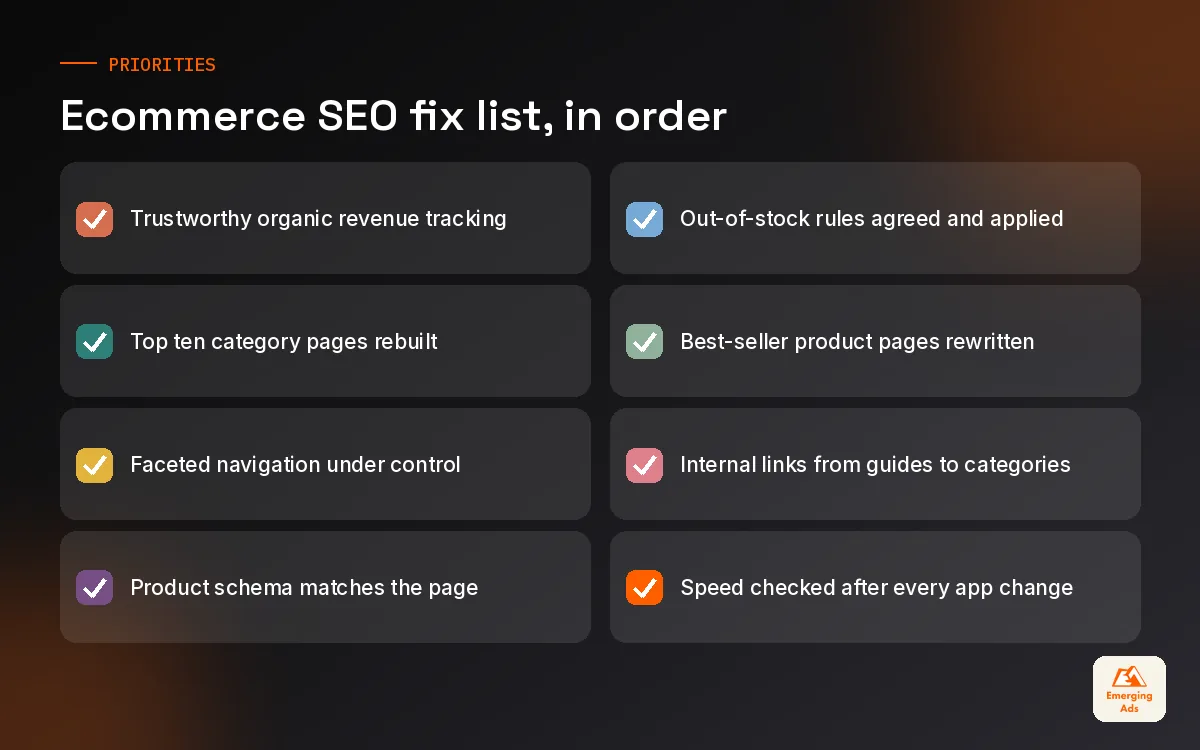
- Fix tracking so organic revenue by landing page is trustworthy.
- Rebuild the top ten category pages by revenue potential.
- Tame faceted navigation and crawl waste.
- Correct product schema, out-of-stock handling and redirects.
- Rewrite best-seller product pages and fix internal linking.
- Build supporting content that feeds the categories.
That order has held up on almost every store we have taken on. If you want a team to run it for you, our ecommerce SEO service is built around it, and you can see everything else we do on our services page. For a view on what to expect from a partner, read our piece on choosing an ecommerce SEO agency. Stores with physical shops should also look at our local SEO guide, and more guides live on the usemergingads.com homepage.
Frequently asked questions
Straight answers to what clients ask us most about ecommerce seo.
What is ecommerce SEO?
Which pages matter most for ecommerce SEO?
How much text should a category page have?
Should I write unique descriptions for every product?
How should I handle out-of-stock products for SEO?
What is faceted navigation and why is it a problem?
Is Shopify good for SEO?
Is WooCommerce better than Shopify for SEO?
Does product schema help rankings?
Should an online store have a blog?
How long does ecommerce SEO take to show results?
How do I measure ecommerce SEO success?
Is your store ranking for the wrong pages?
We will look at your categories, filters and product templates and show you where search traffic and revenue are leaking. You get a prioritised list, not a sales call.
Book your free audit