Technical SEO in 2026: A Field Guide From the Sites We Fix
Technical SEO is not a 200-row spreadsheet of warnings. It is the plumbing that decides whether Google can find, read and trust your pages. Here is how we audit it and, more usefully, the order we fix things in.
Key takeaways
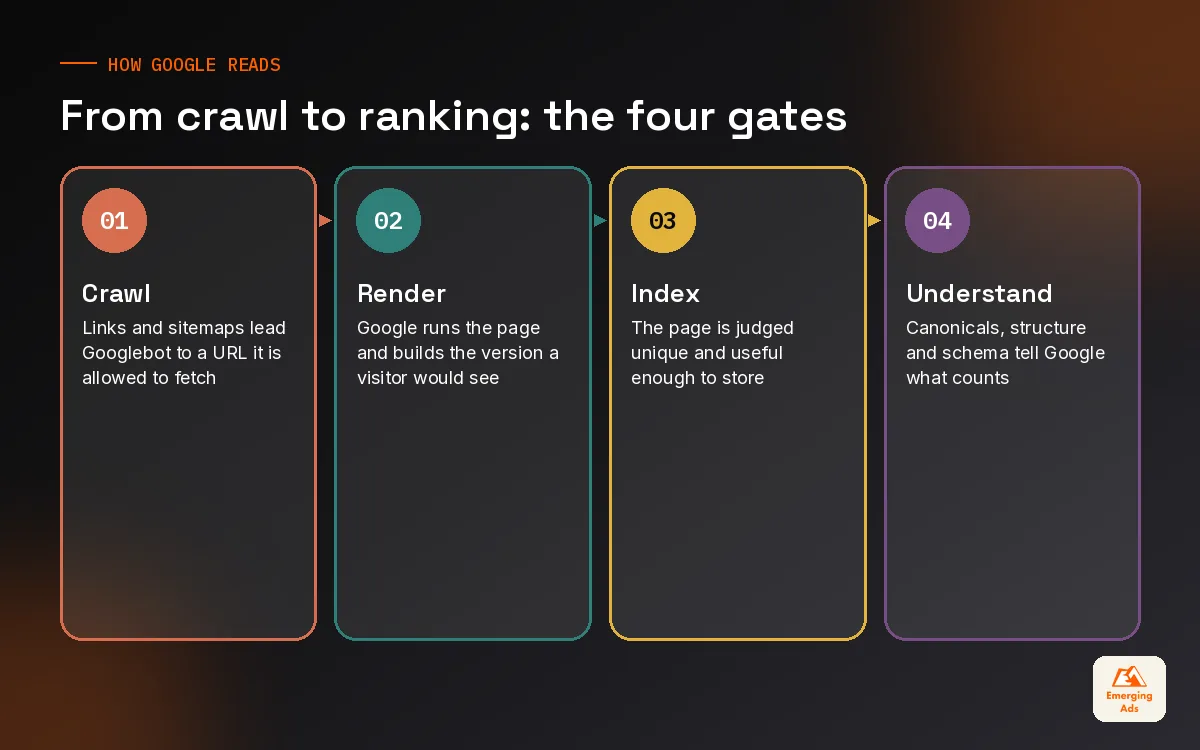
- Technical SEO is about four questions in order: can Google crawl it, render it, index it and understand which version counts.
- Most audits fail because they list every warning at equal weight. Triage by how many valuable URLs an issue touches.
- Search Console’s Page indexing report and your server logs tell you more than any crawler score ever will.
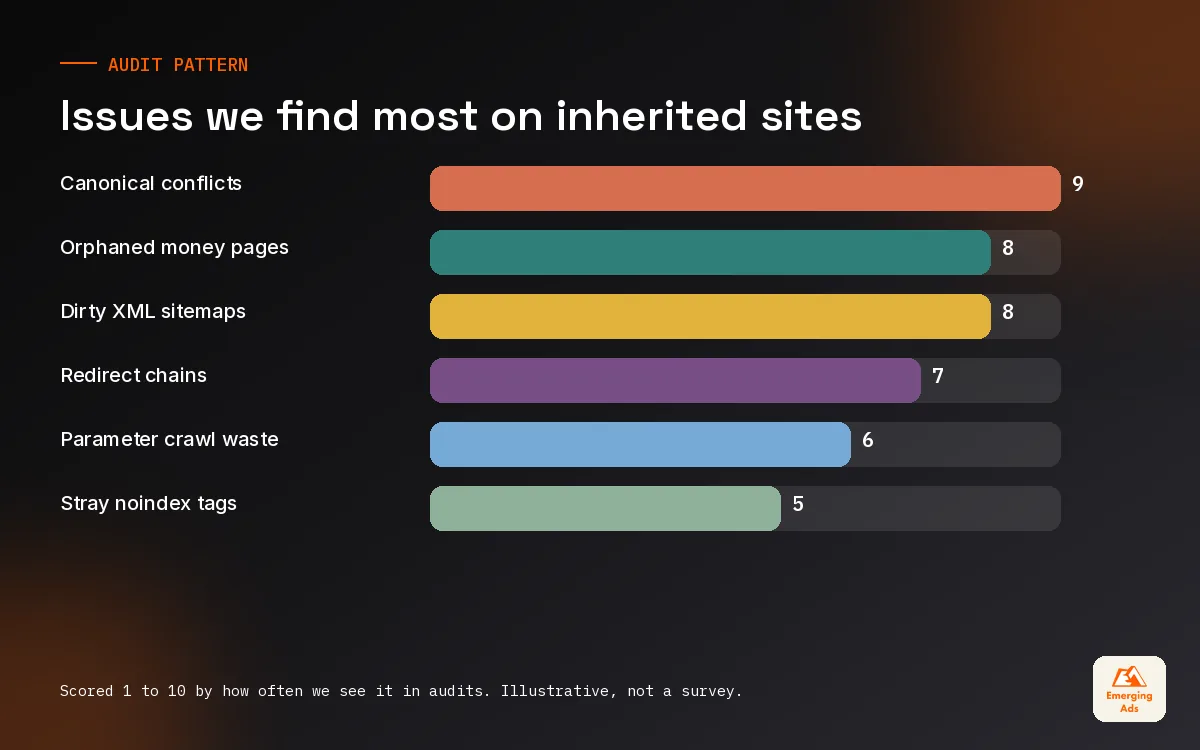
- Canonicals, redirects and sitemaps must all agree. Mixed signals are the most common problem we find on inherited sites.
- Fix indexing blockers first, then duplication and architecture, then speed and structured data polish.
01What technical SEO really covers (and what it does not)
When a founder asks us about technical SEO, they usually mean one of two things: a site that has quietly dropped out of Google, or an audit tool that has just emailed them a health score of 61 out of 100. The first is urgent. The second is often noise. Technical SEO is the work that makes sure search engines can discover your pages, render them the way a visitor sees them, store them in the index and understand which version of each page is the real one. Everything else in search engine optimisation sits on top of that foundation.
It is not copywriting, it is not link building and it is not choosing keywords. Those matter just as much, but they are wasted if the page carrying them is invisible or split across five duplicate URLs. We have taken on sites with genuinely excellent content that ranked for almost nothing, because a staging robots.txt rule had been copied to production during a redesign. Nobody noticed for four months. The content was never the problem.
The four questions we ask of every site
- Can Google crawl it? Are important URLs linked, allowed in robots.txt and returning a 200 status quickly?
- Can Google render it? Does the main content and the internal linking exist in the HTML, or only after JavaScript runs?
- Will Google index it? Is the page unique, useful and free of noindex tags or conflicting canonical signals?
- Does Google understand it? Is the site structure clear, is the right version canonical, and does structured data describe the page accurately?
If you keep those four questions in that order, most technical SEO decisions become obvious. A slow page that is not indexed is not a speed problem. It is an indexing problem, and it gets fixed first.
02Crawling: helping Google find the pages that earn money
Crawling is discovery. Googlebot follows links and reads sitemaps, and it has only so much patience for any single site. For a 40-page service business, crawl budget is almost never the issue. For a WooCommerce store with 3,000 products and a filter system that generates a new URL for every combination of size, colour and price, it very much is.
Robots.txt: a scalpel, not a mop
Robots.txt tells crawlers which paths they may request. It does not remove a page from the index. We see this misunderstanding weekly: a client blocks a folder of thin pages in robots.txt, and months later those URLs still appear in results with no description, because Google knows they exist but is not allowed to read the noindex tag on them. If you want a page out of the index, let it be crawled and use noindex, or remove it and return a 404 or 410. Use robots.txt to stop crawlers wasting time on internal search results, cart pages and endless parameter combinations.
Internal links do more work than sitemaps
An XML sitemap is a hint. An internal link from a page Google already values is a much louder one. On a B2B site we inherited last year, the highest-margin service pages sat four clicks deep behind a mega menu that only rendered on hover through JavaScript. Moving those links into the plain HTML navigation and adding contextual links from the blog did more for those pages than any sitemap resubmission. If you are on WordPress, this is often a theme decision, and it is worth raising with whoever handles your WordPress website design before the next rebuild.
03Rendering and JavaScript: what Google sees vs what you see
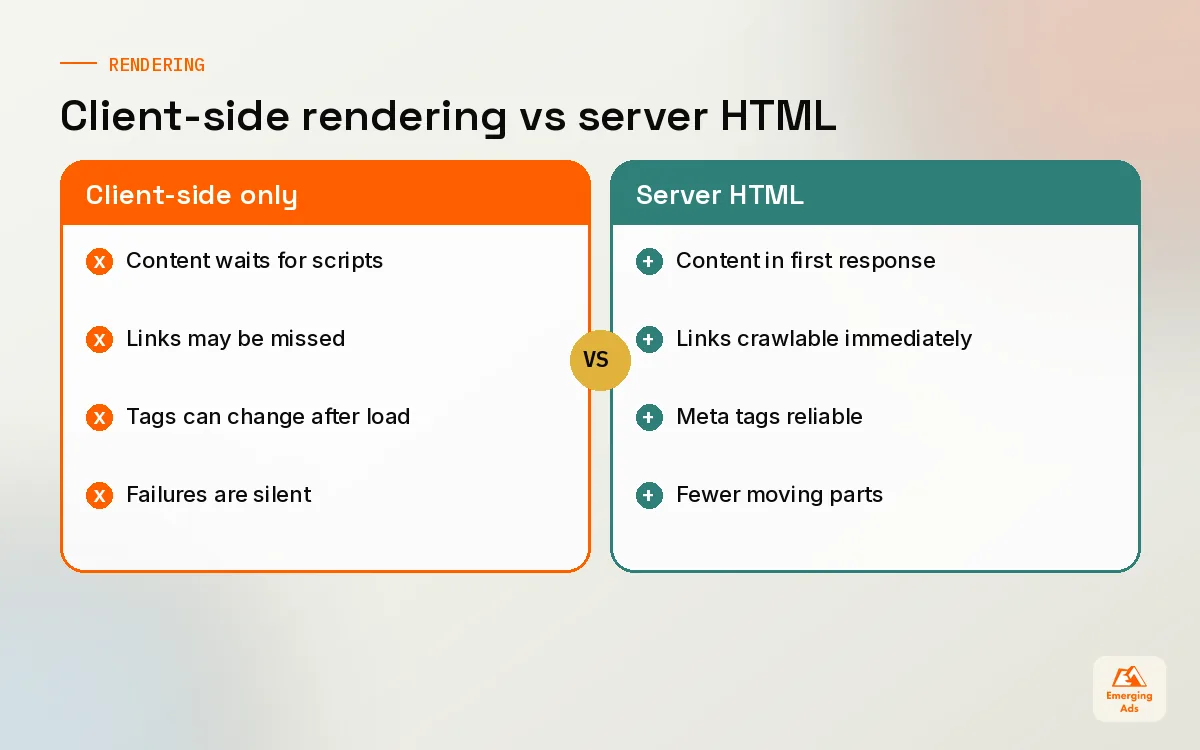
Google renders pages with an up to date version of Chromium, so it can process most modern JavaScript. The catch is that rendering is a separate step and can happen later than the initial crawl. If your product descriptions, prices or internal links only appear after a script runs, you are relying on that second step going smoothly every time.
Our simple test: open the page, view the raw source (not the inspected DOM), and search for a sentence from the main content. If it is not there, the page depends on client-side rendering. Then use the URL Inspection tool in Search Console, look at the rendered HTML Google captured, and compare. We have found headless builds where the rendered HTML Google stored was missing half the page because an API call timed out.
| Rendering approach | What Google receives first | Risk level for SEO | Where we see it |
|---|---|---|---|
| Server-side rendering (SSR) | Full HTML with content and links | Low | Most WordPress and Shopify themes |
| Static generation | Pre-built HTML files | Low | Marketing sites on modern frameworks |
| Hybrid or hydration | HTML shell plus some content | Medium, depends on what is deferred | Headless ecommerce builds |
| Client-side only (CSR) | Mostly empty shell | High for content and links | Older single page apps, some app builders |
None of this means JavaScript is bad for SEO. It means the critical things (main copy, headings, links, canonical and meta robots tags) should be present in the HTML the server sends. Everything else can be enhanced afterwards.
04Indexing: reading the Page indexing report like a practitioner
The Page indexing report in Search Console is the single most useful technical SEO screen we open. It tells you which URLs Google has chosen not to index and, roughly, why. If your team has never set it up properly, our Google Search Console setup work usually starts here, because the reasons listed shape the whole audit.
| Status you will see | What it usually means on real sites | What we do first |
|---|---|---|
| Crawled, currently not indexed | Google read it and decided it was not worth storing yet | Check for thin or near-duplicate content and weak internal links |
| Discovered, currently not indexed | Google knows the URL but has not crawled it | Improve internal linking; check server speed and crawl waste |
| Duplicate, Google chose different canonical | Your canonical tag is being overruled | Find the conflicting signals: links, sitemaps, redirects |
| Excluded by noindex tag | Someone asked for this, deliberately or not | Confirm every noindex is intentional |
| Blocked by robots.txt | Crawling disallowed | Confirm the block is intended and not hiding key pages |
| Page with redirect | URL redirects elsewhere | Remove redirected URLs from sitemaps and internal links |
A big number in the excluded column is not automatically bad. A Shopify store will always show plenty of excluded URLs because of tag pages, variant parameters and collection filters. What matters is whether pages you want indexed are sitting in there. Export the list, filter by your important templates (product, category, service, location) and start with those.
A quick diagnostic we run on every new account
- Count the URLs in your XML sitemaps and compare with the indexed count for those sitemaps in Search Console.
- Sample 20 URLs from the “crawled, currently not indexed” list and read them honestly. Would you index them?
- Search for the site’s most important page by exact title. If it does not appear, inspect it before doing anything else.
- Check the rendered HTML of one page per template for a stray noindex, often added by a plugin or staging setting.
05Canonicals, redirects and duplicate URLs
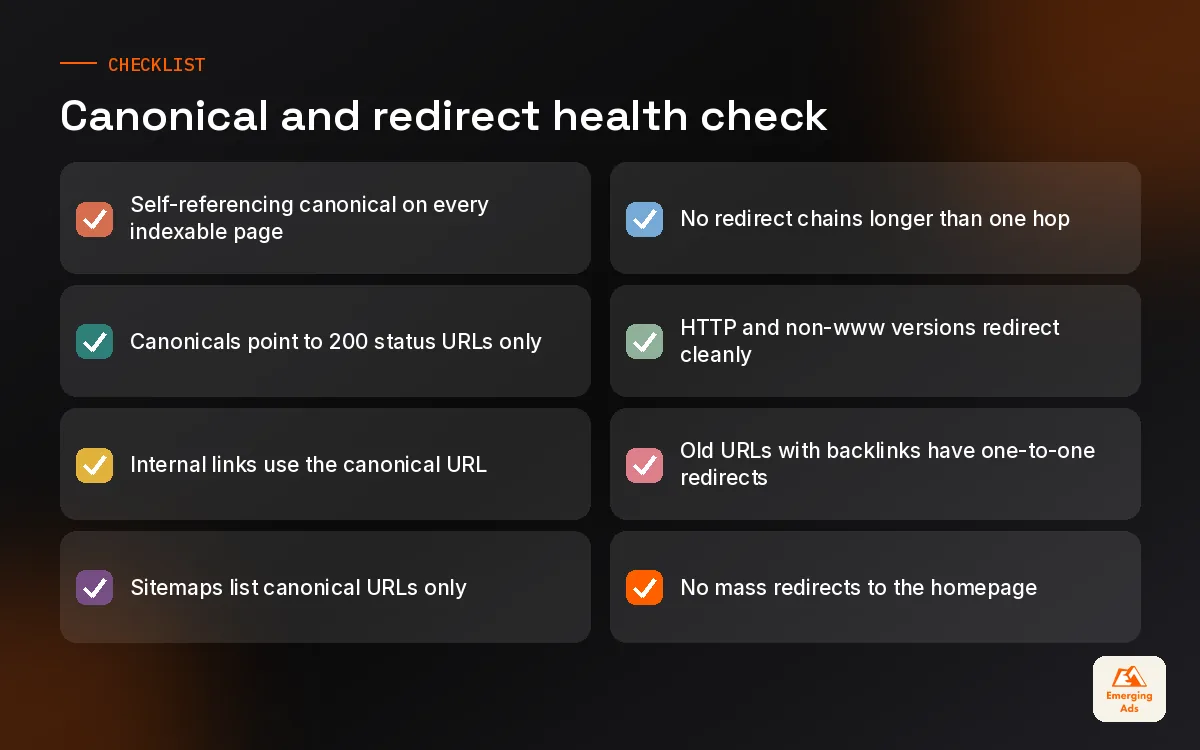
Duplication is the quiet killer on ecommerce and multi-location sites. The same product sits under three collection paths. The same service page exists with and without a trailing slash. HTTP and HTTPS both resolve. Each duplicate splits signals and asks Google to guess which one you meant.
A canonical tag is a strong hint, not a command. Google weighs it alongside internal links, sitemap entries, redirects and hreflang. When those signals disagree, Google picks its own canonical, and that is exactly what the “Google chose different canonical than user” status is telling you. On one Shopify store we manage, internal links pointed to the collection-scoped product URL while the canonical pointed to the clean product URL. Once the theme was edited to link to the clean URL everywhere, the conflicts cleared over the following weeks. If you run Shopify, this is one of the first things our Shopify website management team checks in a theme.
Redirect hygiene
- Use 301s for permanent moves. Temporary redirects left in place for years send a muddled message.
- Kill chains. A to B to C to D wastes crawl requests and slows users. Point A straight at D.
- Update internal links after a redirect instead of relying on it forever.
- Map redirects before a migration, not after traffic drops. Every old URL with links or traffic needs a destination.
- Do not redirect everything to the homepage. Google tends to treat that as a soft 404.
06Site architecture, XML sitemaps and international setups
Good architecture is a technical SEO decision disguised as a design one. Pages that sit close to the homepage and receive many internal links are treated as more important. Group pages into clear sections (services, industries, locations, resources) and link between related items so both people and crawlers can follow the logic.
XML sitemaps that actually help
A sitemap should list only canonical, indexable URLs that return a 200 status. A single sitemap file can hold up to 50,000 URLs or 50MB uncompressed, so larger sites split them, ideally by template: products, categories, posts, locations. That split pays off later, because Search Console then shows indexing coverage per sitemap and you can see at a glance that, say, only a fraction of product pages are indexed. Keep lastmod accurate. A lastmod that updates every day on every URL teaches Google to ignore it.
Hreflang and multi-region sites
If you sell into several countries or languages, hreflang tells Google which version to show to which audience. It is fiddly: every page must reference itself and its alternates, and the references must be reciprocal. Most hreflang problems we find are missing return links or tags pointing at redirected URLs. For brands expanding into the Gulf, the UK and Europe from one domain, our international SEO services usually start with a hreflang audit before any new content is written.
07Log files, structured data and the rest of the toolkit
Crawlers simulate. Server logs record. A log file shows every request Googlebot actually made, which templates it spends time on and which it ignores. On a large catalogue we analysed, a big share of Googlebot requests went to filtered URLs that were never meant to be indexed, while newer products waited weeks for a first crawl. Blocking those filter paths and tidying internal links changed where Googlebot spent its time. Always verify Googlebot by reverse DNS, as plenty of scrapers pretend to be it.
Tools we use and what each is good for
| Tool | Best at | Where it misleads |
|---|---|---|
| Google Search Console | What Google actually indexed and why | Data is sampled and delayed |
| Screaming Frog | Full crawls, redirect maps, rendering checks | Flags warnings that may not matter |
| Server log analysers | Real Googlebot behaviour | Needs clean, verified logs |
| PageSpeed Insights | Field and lab performance data | Lab scores vary run to run |
| Rich Results Test | Structured data eligibility | Valid markup does not guarantee a rich result |
Our starting point is almost always a full crawl, and our Screaming Frog technical SEO audit pairs that crawl with Search Console and log data so every issue is tied to real URLs. For a free overview first, our main site also keeps a shorter technical SEO checklist you can work through.
Structured data: describe, do not decorate
Schema markup helps search engines understand entities on a page: a product with a price, an organisation with an address, an article with an author. It can make pages eligible for rich results, but eligibility is not a promise, and Google has narrowed some rich result types over the years, FAQ rich results being the best known example. Mark up what is genuinely on the page, keep it consistent with visible content, and validate it after every theme update. We usually deploy it through the template or a controlled Google Tag Manager setup only when the CMS gives us no cleaner option.
Core Web Vitals belong in this toolkit too. Google’s published good thresholds are LCP of 2.5 seconds or less, INP of 200 milliseconds or less and CLS of 0.1 or less. They matter, but in our experience they rarely rescue a page with indexing or duplication problems. For stores where speed is the real bottleneck, we run a dedicated Shopify speed optimisation sprint once the indexing picture is clean.
08The technical SEO triage order we use on live accounts
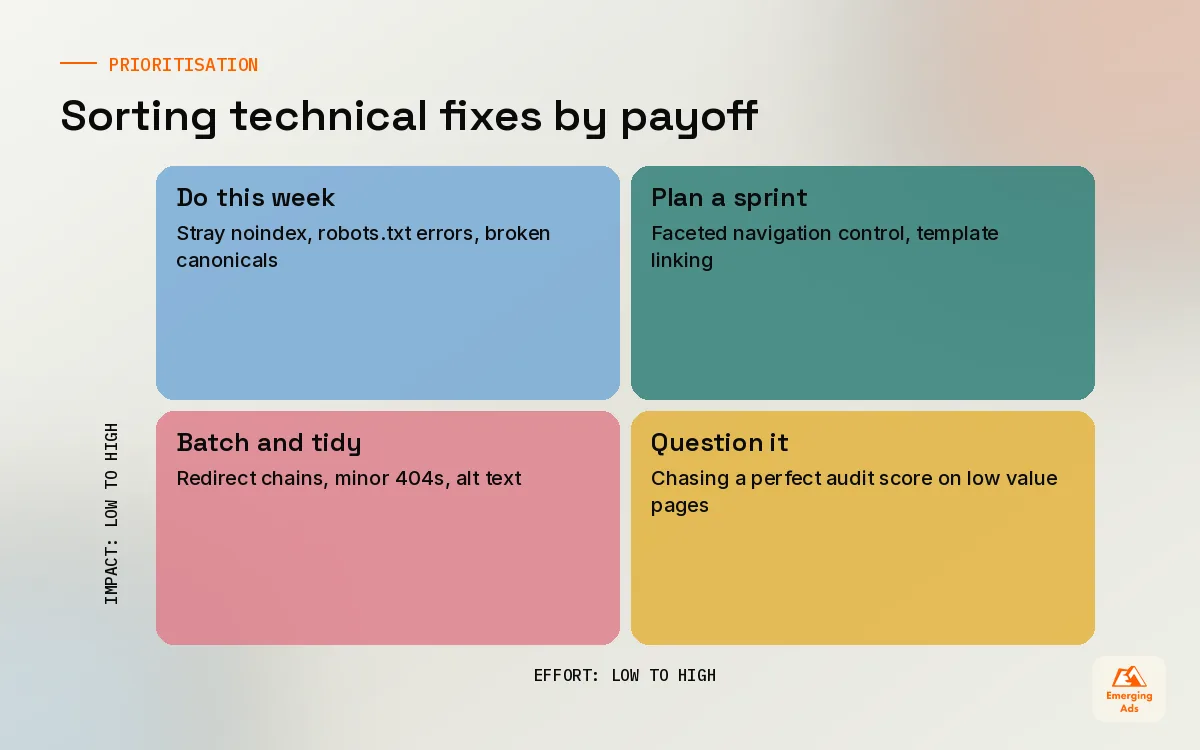
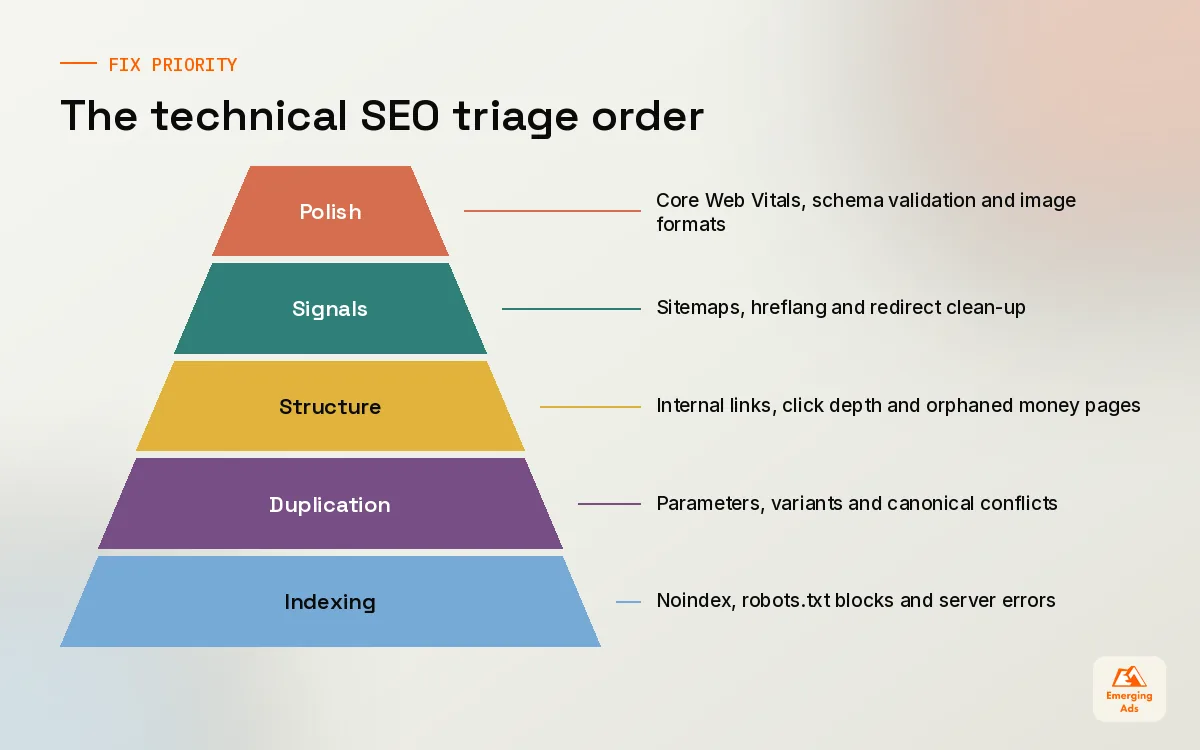
Every audit produces more fixes than any team can ship in a month. The skill is ordering them. We score each issue by how many valuable URLs it touches and how directly it blocks crawling or indexing, then work down the list. This is the order that has served our clients best across ecommerce, SaaS and local service sites.
- Indexing blockers. Stray noindex tags, robots.txt blocking key folders, broken canonicals pointing at the wrong page, server errors.
- Duplication and canonical conflicts. Parameter URLs, trailing slash variants, collection paths, HTTP vs HTTPS.
- Architecture and internal linking. Orphaned money pages, deep click depth, JavaScript-only navigation.
- Redirects and broken links. Chains, loops, 404s with backlinks pointing at them.
- Sitemaps and hreflang. Clean, split, accurate, reciprocal.
- Performance and structured data. Core Web Vitals, schema validation, image formats.
A slow page that is not indexed is not a speed problem. Fix the order, and the order fixes the site.
For ecommerce, filters and variants push duplication up the list, and our ecommerce SEO work tends to spend more of its first month on crawl control than anything else. Content-led sites usually move faster to internal linking and template fixes on titles and headings, which is where on-page SEO services pick up the baton.
09When to handle technical SEO in-house and when to call for help
Plenty of technical SEO can be done by a sharp marketing lead with Search Console, a crawler and a developer willing to listen. Checking the Page indexing report monthly, keeping sitemaps clean and fixing broken internal links does not need an agency. Migrations, headless rebuilds, large catalogues and international setups are different. The cost of a mistake is measured in months of lost traffic, and the fixes need someone who has seen the failure before.
If you want a second pair of eyes, you can browse everything we do on our services page, or head back to the EmergingAds SEO blog homepage for the rest of this series. Next in the series we move from how Google reads a site to what people type into it, starting with keyword research.
Frequently asked questions
Straight answers to what clients ask us most about technical seo.
What is technical SEO in simple terms?
How often should we run a technical SEO audit?
Does robots.txt stop a page from being indexed?
What does crawled, currently not indexed mean?
Is JavaScript bad for SEO?
Should every page have a canonical tag?
How long do technical SEO fixes take to show results?
Do XML sitemaps improve rankings?
What is the difference between a 301 and a 302 redirect for SEO?
Do Core Web Vitals matter more than other technical fixes?
Can we do technical SEO without a developer?
Want to know which technical fixes actually matter on your site?
We will crawl your site, read your Search Console data and hand you a ranked list of fixes, starting with the ones that stop pages being indexed.
Book your free audit